
Install on your watch
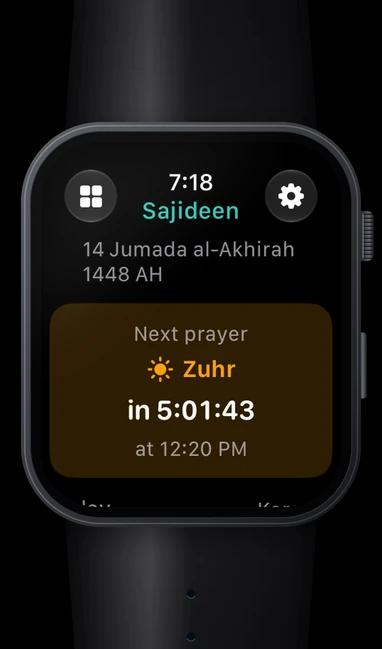
The Apple Watch app installs with the iPhone app. Install Sajideen on your iPhone and it appears on the paired watch. If it does not, open the Watch app on the iPhone, scroll to Sajideen and tap Install. The watch app needs watchOS 26.5 or later, so it works with an Apple Watch that can run it and an iPhone paired to it.
Why a prayer app belongs on the wrist
Most prayer apps send one notification when a prayer time begins and then go quiet. On a busy day that notification gets swiped away with every intention of praying in ten minutes, and the next time you look up, the next prayer is coming in. A phone face down on a desk is easy to ignore. A tap on your wrist is not.
That is why Sajideen was built for Apple Watch before the iPhone. On the watch, a check-in is a tap on your arm rather than a sound you might not hear, and Mark as prayed is a single tap.
Salah reminders that escalate until you pray
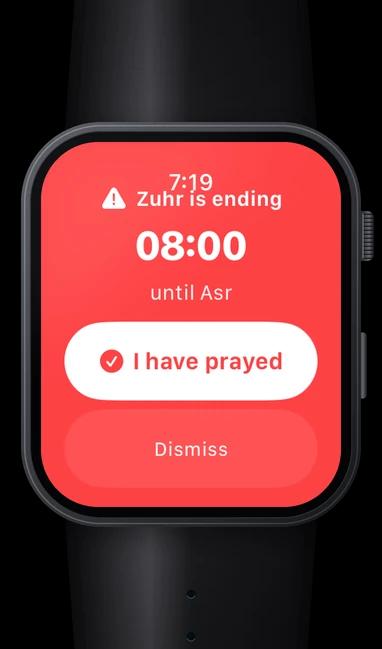
Every prayer runs through the same chain. When its time begins, you get a start alert. If you have not marked the prayer, Sajideen checks in again during the prayer window. Shortly before the time runs out, it sends a final red “go to salah” warning. The moment you mark the prayer, on the watch, the iPhone or the notification itself, every remaining reminder for that prayer is cancelled.
Each prayer has its own rules. Fajr is short, so it checks in early and often. Isha runs until dawn, so its check-ins are spaced out and capped at three, because nobody wants a nudge every ten minutes at 2 am. On Fridays, Jumu'ah takes the place of Dhuhr with a single check-in, since it is prayed at the masjid at a fixed time.
Reminders are sent as time-sensitive notifications so they are not held back in a summary. If you use a Focus mode, add Sajideen to its allowed apps; the support page has a checklist for when reminders do not arrive. On iPhone there is also an opt-in Prayer alarm: a full-screen alarm, built on Apple's AlarmKit, if a prayer is about to end and you have not marked it.
Adhan, complications and the watch face
When a prayer begins, the adhan can play on the watch itself. Complications put the current prayer and the time left on the watch face you already use, so you rarely need to open the app at all. On the iPhone, a Live Activity counts down on the Lock Screen and in the Dynamic Island, and Home and Lock Screen widgets show today's times.
A prayer log that syncs without an account
The watch and the iPhone keep their own copies of your prayer log and sync directly over Apple's WatchConnectivity. Nothing goes through a server, and there is no login. If you undo a mark on the watch while it is away from the phone, the undo is kept as a timestamped record, so the newest change wins on both devices the next time they meet.
Accurate prayer times, calculated on your device
Prayer times are calculated on your device from your location and the date, with no API call: the University of Islamic Sciences, Karachi method, with Fajr and Isha at 18° below the horizon, and the Hanafi rule for Asr. You can use GPS or pick a city. The prayer day runs from Fajr to Fajr, so a late Isha after midnight still counts for the right day, and the app shows the Makruh times to avoid.
Tools that work on the wrist
The tools around the reminders run on the watch too, so your phone can stay in your pocket: a Tasbih counter, a Tawaf and Sa'i counter for Hajj and Umrah, and a Qibla finder with voice guidance. If you use a Wear OS watch instead, see Sajideen for Android and Wear OS.