
Why it exists
In 2026, the developer of Sajideen went for Hajj. During Tawaf, in the crowd, he kept losing count of his rounds. Each round starts at the green light, the green line opposite the corner of the Black Stone, and every time you reach it you have to remember which round you are on. With so many people around you, and your heart where it should be, that is harder than it sounds. The only help he had was a manual tasbih.
He looked for a good Apple Watch app that could count Tawaf rounds on the wrist and could not find one, nor one for Sa'i between Safa and Marwah. So he built them, and they are now part of Sajideen.
How the Tawaf counter works
Open the Tawaf counter before you begin. Each time you reach the green light, tap once. The watch shows which round you are on, from the Black Stone around to the Black Stone, until all seven are done. If you tap by mistake, Undo takes the last tap back, and Reset starts again.
Next to the counter is a short guide to what is authentically reported during Tawaf, with an honest note that there is no authentic du'a fixed for each round. Like every religious text in Sajideen, the texts in the guide are taken verbatim from the Qur'an and from Sahih al-Bukhari and Sahih Muslim, pulled from open datasets by a script and never typed from memory.
How the Sa'i counter works
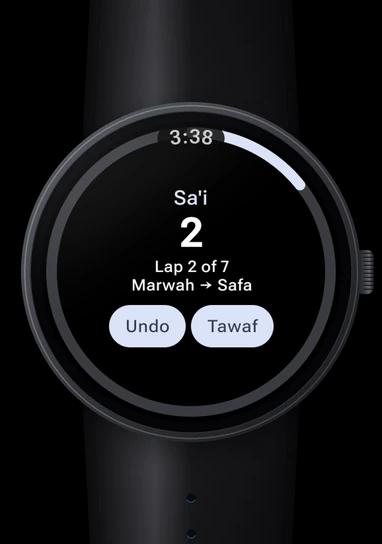
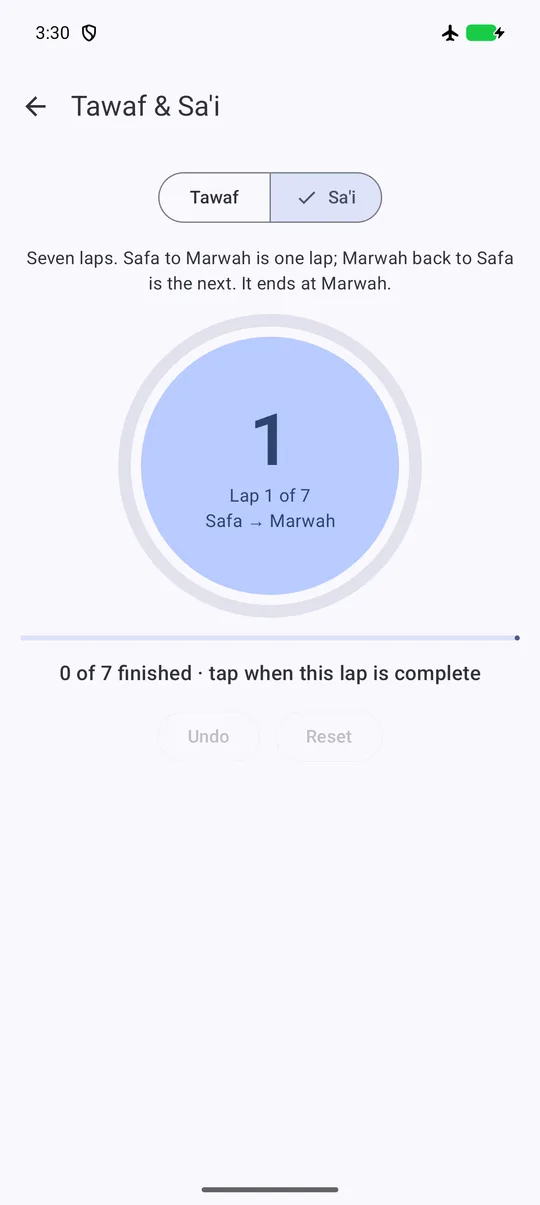
Sa'i is seven laps between Safa and Marwah. Safa to Marwah is one lap, Marwah back to Safa is the next, and the seventh ends at Marwah. The screen always shows the lap you are on and which way you are walking, so a glance at your wrist answers both questions at once. One tap moves you to the next lap, with Undo if you need it. On Wear OS, Tawaf is one tap away from the Sa'i screen.
Made for the crowd
- On the watch. The counters run on Apple Watch and Wear OS, so your phone can stay in your pocket and your hands stay free.
- On the phone too. The same counters are in the iPhone and Android apps, if you prefer to hold your phone.
- No connection needed. Counting happens on the device, with no account and nothing to sign in to.
Around the rest of your journey
The same app keeps your prayer times and reminders, calculated on device for wherever you are, including Makkah and Madinah. There is a Tasbih counter for your dhikr, and a Qibla finder that talks you round to the right direction when you are away from the Haram. If you are travelling with an Apple Watch, read more about Sajideen on Apple Watch; for a Wear OS watch, see Sajideen for Android and Wear OS.